



Quick Answer
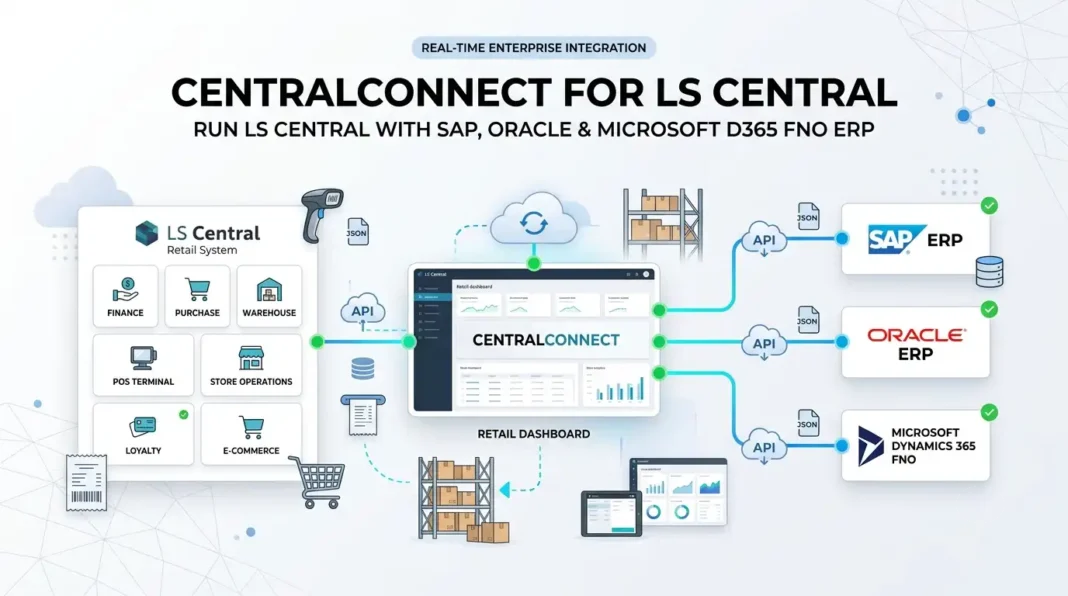
CentralConnect is LS Retail’s fully managed integration that lets you run LS Central as your POS and retail operations platform while keeping a different enterprise ERP (such as SAP S/4HANA, Dynamics F&O, or Oracle) as your financial back end. Data moves both ways over Azure services, specifically Azure Storage, Azure Functions and Service Bus. It is aimed at large chains and enterprises that want LS Central’s retail and hospitality depth without replacing an ERP they have already invested heavily in. Adidas, Boots Norway and McKesson Norway all use it with SAP S/4HANA.
If you have worked with LS Central for years, CentralConnect requires a small mental adjustment. The whole LS Central proposition has always been that POS and ERP live in one platform: LS Central extends Microsoft Dynamics 365 Business Central, so your till and your general ledger are the same system. That unity is the selling point.
CentralConnect changes that arrangement deliberately. It lets a business use LS Central for everything front of house and store operations, while the corporate ERP stays as it is. For a large enterprise running SAP, Dynamics F&O or Oracle across dozens of countries, that is a very attractive middle path. This guide explains what CentralConnect actually is, how it works technically on Azure, which brands already run it, who it genuinely suits, and the questions worth asking before anyone signs anything.
💡 Note on the name: the product is officially CentralConnect, written as one word without “LS” in front. You will often see it called “LS Central Connect” or “LS Connect” in conversation and in job adverts. They all refer to the same thing.
📋 In This Guide
- What CentralConnect Is
- The Architecture Shift (The Key Point)
- How It Works Technically (Azure Architecture)
- What Implementation Involves
- Which ERP Platforms Are Supported
- Who Actually Uses It
- The Enterprise Problem It Solves
- What LS Retail Says You Gain
- Standard LS Central vs LS Central With CentralConnect
- Who It Suits, and Who It Does Not
- Questions to Ask Before You Commit
- FAQ
Table of Contents
What CentralConnect Is
CentralConnect is a certified, LS Retail managed integration between LS Central and an enterprise ERP. Two words in that description carry most of the weight.
Certified means it is a supported product with a defined scope, not a bespoke project written once and then orphaned. Managed means LS Retail delivers and maintains the integration themselves, including through upgrades, rather than leaving you dependent on whichever developer originally built your connector.
That second point is the real commercial argument. Most large retailers who run a separate POS and ERP have a custom integration somewhere in the middle, often built years ago, understood by two people, and quietly terrifying at upgrade time. CentralConnect is positioned as the replacement for exactly that kind of fragile, developer-dependent connection.
💼 From 19 Years in the Field
The hidden cost in enterprise retail is almost never the POS licence. It is the integration nobody owns. I have seen upgrade projects stall for months because the only person who understood the POS-to-ERP interface had left the business three years earlier. A vendor-owned, vendor-supported integration removes a genuine category of risk, and that is worth more than most feature comparisons.
The Architecture Shift (The Key Point)
This is the part that matters most for anyone who already knows LS Central, so it is worth being very clear.
In a standard LS Central deployment, LS Central is an extension of Microsoft Dynamics 365 Business Central. Business Central is the ERP. Your POS transactions, inventory, purchasing and financials all live in the same application and the same database, which is why LS Central can trace a single POS transaction through to the general ledger.
With CentralConnect, that changes. LS Central still runs on the Business Central platform technically, but it is no longer acting as your corporate system of record for finance. Instead:
- LS Central handles the retail and hospitality side: POS, store operations, inventory at store level, loyalty, promotions, eCommerce, kitchen and self-service.
- Your enterprise ERP stays the financial and corporate backbone: general ledger, consolidated reporting, procurement, and whatever else it already governs.
- CentralConnect is the managed pipe between them, keeping data consistent in both directions.
Data moves bi-directionally between the two systems, covering master data, transactions and sales. Typically master data such as items, pricing and business partners originates in the ERP and flows down to LS Central, while transactional results such as sales and inventory movements flow back up. The precise scope and frequency are defined per implementation, so treat those as questions for LS Retail rather than assumptions.
How It Works Technically (Azure Architecture)
This is the part most discussions of CentralConnect skip, and it is what an architect or technical consultant actually needs to know. CentralConnect is not a point-to-point database link or a nightly file dump. It is built on Azure cloud services.
| Component | Role in the integration |
|---|---|
| Azure Storage | Holds the data payloads being exchanged between LS Central and the ERP. |
| Azure Functions | Runs the processing logic that moves and transforms data between the two systems. |
| Azure Service Bus | Provides reliable, queued messaging, so a message is not lost if one side is briefly unavailable. |
On formats and transport, CentralConnect works with XML and JSON depending on direction, and it exchanges data through web services and message queues.
The outbound flow: LS Central to your ERP
- LS Central generates the outbound data (for example completed sales transactions).
- The data is serialised to JSON and written to Azure Blob Storage.
- Azure Functions monitor the storage container and pick up new data as it lands.
- The function packages the data into the format the receiving ERP requires. This is the translation layer that makes the same LS Central output work for SAP or for F&O.
- The ERP consumes the package and processes it into its own tables.
The inbound flow: your ERP to LS Central
- Master data import requires XML documents to be sent to Azure Storage and Azure Service Bus.
- CentralConnect’s import function actively checks Service Bus for new messages.
- When a document is available, it imports the package into LS Central.
- The data lands in a staging table rather than going straight into live tables.
- The data is validated in staging, and only then inserted into LS Central.
- Every step is written to CentralConnect logging.
💼 The two details that matter most
First, the staging table plus validation step. Bad master data never reaches your live tables directly, which is exactly the safeguard homegrown integrations skip and then regret. Second, the Service Bus queue. Message queuing is what separates a resilient integration from a brittle one: if the ERP is down for patching, messages queue rather than vanish. Ask specifically how retries, dead-lettered messages and reprocessing are handled.
Data mapping
Mapping is where the real configuration work happens. You define how fields in the ERP correspond to fields in LS Central. CentralConnect ships predefined templates for common data types, and the mapping entities are held in an Enum that is easily extendable, so a partner can add entities beyond the standard set.
The predefined mapping entities are:
| Mapping Entity | Typical direction and content |
|---|---|
| SalesTransaction | POS sales flowing out of LS Central up to the ERP for financial processing. |
| ItemMaster | Item and product master data coming down from the ERP into LS Central. |
| InventoryLevels | Stock quantities, keeping store and ERP views aligned. |
| CustomerMaster | Customer records shared between the two systems. |
| Vendors | Vendor and supplier master data. |
📌 Scope check: notice what is and is not in that standard list. Sales, items, inventory, customers and vendors are covered out of the box. Anything else your business needs to synchronise, promotions, loyalty balances, employees, purchase orders, is an extension of the Enum and therefore additional scope. Establish that list early, because it is where implementation estimates move.
Logging and monitoring
CentralConnect is built to be traceable, which matters when finance asks why a store’s takings have not reached the ledger. Every transaction can be followed in three places:
- Azure Monitor for the platform level
- Application Insights for detailed telemetry
- CentralConnect logging inside LS Central, so a functional consultant can investigate without needing Azure portal access
That third point is genuinely useful in practice. Being able to answer an integration question from inside LS Central, rather than raising a ticket with whoever holds the Azure credentials, saves a great deal of time during hypercare.
The core design principles
Three ideas underpin the whole thing, and they are worth knowing because they explain why it behaves as it does:
- Message-driven integration. The two systems are loosely coupled and communicate through standardised messages, so neither depends on the other being available at that instant.
- A mapping layer. Data transformation logic sits between the systems so fields align without either system being modified to suit the other.
- Logging and auditing throughout. Traceability is designed in rather than added later.
Because the integration runs on Azure rather than inside either application, it can be scaled and monitored independently, and LS Retail can maintain it without touching your ERP or your LS Central code. That is the mechanism behind the “managed” part of the proposition.
What Implementation Involves
A word of honesty here, because it affects how you plan. LS Retail does not publish a self-service installation guide for CentralConnect, unlike components such as the Hardware Station or the Shopify connector which have full public setup documentation. That is deliberate: CentralConnect is delivered as a managed solution, with the Azure infrastructure and the ERP-side connector scoped and deployed together with LS Retail.
What that means in practice is that the work splits into two halves.
| Delivered with LS Retail | Your project team’s work |
|---|---|
| Azure infrastructure provisioning (Storage, Functions, Service Bus), the ERP-side packaging logic, the certified connector itself, and ongoing maintenance through upgrades. | Defining which entities are in scope, building and testing the field-level data mapping, designing financial reconciliation and period close, validation rules, testing, and cutover. |
Based on how integration projects of this shape actually run, expect roughly these phases. Treat this as a planning shape to discuss with LS Retail, not a published procedure.
- Scoping. Agree which of the five standard entities you need, and which additional ones require extending the mapping Enum. Confirm ERP versions in writing.
- Azure foundation. Provision the Storage, Functions and Service Bus resources. Settle whose subscription they sit in, and how security and data residency are handled.
- Data mapping. The largest and most underestimated task. Map every field in both directions, and decide which system owns each piece of master data. Ambiguous ownership is the single most common cause of trouble later.
- Validation rules. Define what “valid” means in staging, and what should happen to records that fail.
- Financial design. Decide whether sales post as summary journals or detailed transactions, set the cutoff times, and write the reconciliation routine between LS Central and the ERP.
- Testing. Test both directions, and deliberately test failure: take the ERP offline and confirm messages queue and reprocess cleanly.
- Pilot in one store or country. Prove the loop end to end in a single market before scaling.
- Rollout and hypercare. Roll out market by market, with the logging in Azure Monitor, Application Insights and LS Central actively watched during the early weeks.
⚠️ Where these projects slip. Almost never on the Azure plumbing, which LS Retail handles. It is nearly always data mapping and master data ownership. If the ERP team and the retail team both believe they own the item master, you will discover it in testing at the worst possible moment. Settle ownership per entity, in writing, in phase one.
📌 Consultant’s note: if you are used to answering “where did that POS transaction end up in the G/L?” by drilling through one system, expect that question to become a two-system answer. Reconciliation, cutoffs and period close all need explicit design attention in a CentralConnect setup in a way they simply do not in standard LS Central.
Which ERP Platforms Are Supported
LS Retail publicly lists three ERP families for CentralConnect:
| ERP Platform | Status |
|---|---|
| SAP S/4HANA | The most fully documented option, with its own dedicated product page describing the integration and its benefits. |
| Microsoft Dynamics 365 F&O | Named explicitly in the LS Central documentation. This is the scenario where a group runs Finance and Operations as its enterprise ERP rather than Business Central. |
| Oracle | Listed on the LS Retail product site. Confirm the exact products and versions with LS Retail. |
| Other head-office systems | The documentation describes CentralConnect as connecting to third-party ERP or head-office systems generally, so it is not strictly limited to the named three. Scope any other platform with LS Retail directly. |
SAP S/4HANA is clearly the flagship scenario, which makes sense: it is the ERP most likely to be immovable inside a large multinational retail group, and the one where “keep the ERP, upgrade the POS” is the most compelling pitch.
Who Actually Uses It
Reference customers matter more than feature lists when you are proposing an architecture to a board, so it is worth knowing that LS Retail names three global brands using CentralConnect to run LS Central POS against SAP S/4HANA:
- Adidas
- Boots Norway
- McKesson Norway
That mix is telling. Adidas is global fashion retail at scale, Boots is pharmacy retail with heavy compliance requirements, and McKesson is pharmaceutical distribution. Three quite different verticals, all landing on the same architectural answer: keep SAP, standardise the store on LS Central.
💡 Useful in a proposal: if you are making the internal case for this architecture, these names do a lot of work. The pattern is proven at genuine enterprise scale, and pharmacy references in particular help where regulatory compliance is the main objection.
The Enterprise Problem It Solves
Picture a retail group with 400 stores across a dozen countries, restaurants inside some of the larger sites, and SAP embedded across the whole finance function. Their POS estate is a mixture inherited through acquisitions: three different systems, several bespoke integrations, and no consistent way to launch a new market.
They have wanted better retail capability for years. But the two obvious routes are both unattractive. Replacing SAP is an enormous, expensive, high-risk programme that finance will never approve on the strength of a POS argument. Building yet another custom POS-to-SAP integration repeats the mistake they are already living with.
CentralConnect offers a third route: standardise the front end on LS Central, keep SAP exactly where it is, and let the vendor own the connection. That is why this is fundamentally an enterprise architecture decision rather than a POS feature decision.
What LS Retail Says You Gain
Six themes come through consistently in LS Retail’s own material. I have added a practical read on each, because vendor benefit lists always need translating.
| Claim | What It Means In Practice |
|---|---|
| One global standard | The same POS processes, pricing approach and data model everywhere, while still meeting local fiscal, language and currency requirements. Genuinely valuable if you currently run different POS systems per country. |
| Composable architecture | You keep your existing hardware, payment providers and loyalty platform. LS Retail describes the platform as hardware and PSP agnostic, so this is a bolt-on rather than a rip and replace. |
| Fewer systems to manage | One platform covering retail, food service and service points instead of separate systems per concept. Worth quantifying honestly: count the systems you would actually retire. |
| Vendor-managed integration | The strongest argument. No middleware workarounds, no orphaned custom connector, and upgrade support included. This is what you are really buying. |
| Faster staff onboarding | A consistent POS interface across the estate shortens training and helps with early staff turnover. Real, but hard to measure. Do not build the business case on it alone. |
| Scalable for growth | Opening a new store, brand or country becomes a configuration exercise rather than a project. This is also where acquisition-heavy groups get the most value. |
One further point LS Retail emphasises is data consistency for analytics: keeping sales, inventory, financial and customer data aligned across both systems so that reporting, forecasting and AI or Copilot scenarios have a single trustworthy dataset to work from.
Standard LS Central vs LS Central With CentralConnect
| Area | Standard LS Central | LS Central + CentralConnect |
|---|---|---|
| System of record for finance | Business Central, the same platform as the POS | Your enterprise ERP (SAP, Oracle, Microsoft) |
| POS to G/L traceability | Native, inside one application | Across two systems, via the integration. Needs deliberate design |
| Typical customer size | Small, mid-market and large retailers | Large chains and enterprises |
| Integration ownership | Not applicable, it is one system | LS Retail owns and maintains it |
| Main reason to choose it | Simplicity of a single unified platform | Retail capability without replacing the corporate ERP |
| Overall complexity | Lower | Higher, but contained and supported |
Neither is better in the abstract. They answer different questions. If Business Central can be your ERP, standard LS Central is simpler and you should take the simpler option. CentralConnect exists precisely for organisations where that is not on the table.
Who It Suits, and Who It Does Not
CentralConnect makes sense if:
- You are a large chain or enterprise, typically multi-country.
- Your enterprise ERP is effectively fixed, whether for cost, group policy or risk reasons.
- You run mixed concepts (retail, restaurants, service points) and want one platform for all of them.
- You already carry one or more fragile custom POS integrations and want them gone.
- You grow through acquisition and need a repeatable way to harmonise new estates.
It is probably the wrong fit if:
- You are a small or mid-sized retailer. Standard LS Central on Business Central will be simpler and cheaper.
- Business Central could realistically serve as your ERP. Adding a second system and an integration to a problem that does not need it is not an improvement.
- You are shopping primarily on POS features. This is an architecture decision, and the features are the same LS Central features either way.
⚠️ Do not treat this as a free lunch. A managed integration removes the risk of owning one, but it does not remove the integration itself. You still have two systems, two data models, two upgrade cycles and a reconciliation process between them. Going in expecting the simplicity of single-platform LS Central is the fastest route to a disappointed finance team.
Questions to Ask Before You Commit
If you are evaluating CentralConnect, these are the questions I would put on the table early. Most of them are not answered on any public web page, which is exactly why you should ask them.
If you are evaluating CentralConnect, these are the questions I would put on the table early. Most of them are not answered on any public web page, which is exactly why you should ask them.
- What exactly is in scope? Which entities synchronise, in which direction, and what stays manual?
- How often does data move? Real time, near real time, or batched? This drives what your store and finance teams can realistically expect.
- How is financial posting handled? Summary journals into the ERP, or detailed transactions? This shapes your entire reconciliation process.
- Who owns period close? Define cutoffs and the reconciliation routine between LS Central and the ERP before go-live, not after.
- What happens on upgrade? When LS Central or the ERP has a major release, who tests the integration, and what is the supported version matrix?
- What are the failure modes? If the link is down, what still works in store, what queues on Service Bus, and how are retries, dead-lettered messages and reprocessing handled and monitored?
- Who owns the Azure resources? Whose subscription do the Storage, Functions and Service Bus components sit in, who monitors them, and how does that fit your security and data-residency requirements?
- Which exact ERP versions are certified? “SAP” and “Oracle” are families, n
- ot versions. Get specifics in writing.
- How does local compliance work? Fiscal receipt rules, e-invoicing and tax reporting vary by country. Establish which system is responsible for each obligation in each market.
- What is the commercial model? How is CentralConnect licensed and supported, and what sits inside versus outside that support boundary?
Question eight deserves emphasis for anyone operating in the Gulf or India. Requirements such as ZATCA e-invoicing in Saudi Arabia are not optional, and in a two-system architecture you must be explicit about whether the POS platform or the ERP produces and submits the compliant document.
FAQ, CentralConnect for LS Central
What is CentralConnect?
It is LS Retail’s certified, fully managed integration connecting LS Central to an enterprise ERP. It allows LS Central to run as your POS and retail operations platform while your existing ERP remains the financial system of record.
Is it called CentralConnect or LS Central Connect?
The official name is CentralConnect, one word, with no “LS” prefix. “LS Central Connect” and “LS Connect” are common informal variations that refer to the same product.
Which ERP systems does CentralConnect support?
The LS Central documentation names SAP and Microsoft Dynamics 365 F&O, and the LS Retail product site also lists Oracle. It is described more broadly as connecting to third-party ERP or head-office systems, so other platforms may be possible. SAP S/4HANA is the most fully documented scenario. Confirm exact certified products and versions with LS Retail.
How does CentralConnect work technically?
Outbound, LS Central serialises data to JSON into Azure Blob Storage, where Azure Functions pick it up and package it into the format the receiving ERP needs. Inbound, XML documents are sent to Azure Storage and Service Bus, CentralConnect polls the queue, imports into a staging table, validates, then inserts into LS Central. Every step is logged.
Which companies use CentralConnect?
LS Retail names Adidas, Boots Norway and McKesson Norway as brands using CentralConnect to integrate LS Central POS with SAP S/4HANA, spanning fashion retail, pharmacy retail and pharmaceutical distribution.
Can we install and configure CentralConnect ourselves?
Partly. LS Retail does not publish a self-service installation guide, and the Azure infrastructure plus the ERP-side connector are scoped and deployed together with LS Retail as a managed solution. However the data mapping and validation configuration is real project work done in LS Central by your team or partner, and that is where most of the effort sits.
What data can CentralConnect synchronise?
Predefined mapping templates cover five entities: SalesTransaction, ItemMaster, InventoryLevels, CustomerMaster and Vendors. The mapping entities are held in an extendable Enum, so additional entities can be added, but treat anything beyond those five as extra scope.
How is imported data protected from errors?
Inbound data lands in a staging table first, where it is validated before being inserted into LS Central. That means invalid master data does not go straight into your live tables.
How do you troubleshoot a CentralConnect issue?
Transactions are traceable in three places: Azure Monitor at platform level, Application Insights for detailed telemetry, and CentralConnect’s own logging inside LS Central. That last one lets a functional consultant investigate without needing Azure portal access.
Does CentralConnect mean LS Central no longer uses Business Central?
No. LS Central is still built on the Business Central platform. What changes is the role Business Central plays: it is no longer your corporate financial system of record, because the enterprise ERP takes that role.
How is this different from a normal LS Central implementation?
In a standard implementation, POS and ERP are one system, so a POS transaction traces natively to the general ledger. With CentralConnect there are two systems joined by a managed integration, so traceability, reconciliation and period close all need deliberate design.
Who is CentralConnect for?
Large chains and enterprises, usually multi-country, whose ERP cannot or will not be replaced, and who want a single standardised retail platform across markets and concepts. Small and mid-sized retailers are generally better served by standard LS Central.
Does it replace a custom POS to ERP integration?
That is precisely its purpose. LS Retail positions CentralConnect as a stable, vendor-supported alternative to fragile, developer-dependent custom connectors, including through upgrades.
Do we have to change our POS hardware or payment provider?
LS Retail describes the platform as hardware and payment-provider agnostic, and as composable, so you can generally retain existing hardware, PSPs, loyalty and eCommerce systems. Validate your specific estate during evaluation.
Final Thoughts
CentralConnect is best understood as an answer to a very specific enterprise question: how do you get modern retail and hospitality capability when your ERP is not going anywhere? By making LS Central the standardised front end and leaving the corporate ERP untouched, it sidesteps a re-platforming programme that would never get approved on POS grounds alone.
The genuine value is less about features and more about ownership. Anyone can build an integration between a POS and an ERP. Very few organisations can keep one healthy through a decade of upgrades and staff turnover. Buying an integration that the vendor maintains removes a real and recurring risk.
Just go in clear-eyed. You are choosing a two-system architecture with the complexity that implies, and the reconciliation, compliance and upgrade questions above need answers before go-live rather than after. Ask them early, get them in writing, and CentralConnect can be a very sensible piece of enterprise retail design.
Stay tuned to NavisionPlanet for more practical LS Central and Business Central guidance drawn from real multi-country implementations.
Note: CentralConnect is an LS Retail product and its scope, supported ERP versions and commercial terms are set by LS Retail and can change. This guide is an independent explanation for consultants and retailers, based on LS Retail’s published product information. The technical architecture, data flow and mapping entities described here reflect the CentralConnect pages in the LS Central Help. The implementation phases are the author’s guidance based on integration project experience, not a published LS Retail procedure. Confirm all specifics there, on the official CentralConnect product page, or with LS Retail directly before making any decision. LS Retail and LS Central are trademarks of LS Retail ehf.
📖 Related guides on Navision Planet:
→ LS Central Architecture Explained
→ Gift Card in LS Central: Setup, Sell and Redeem
→ LS Central Technical Interview Questions + Mock Exam
→ Manufacturing in Business Central: The Complete Guide