

Quick Answer
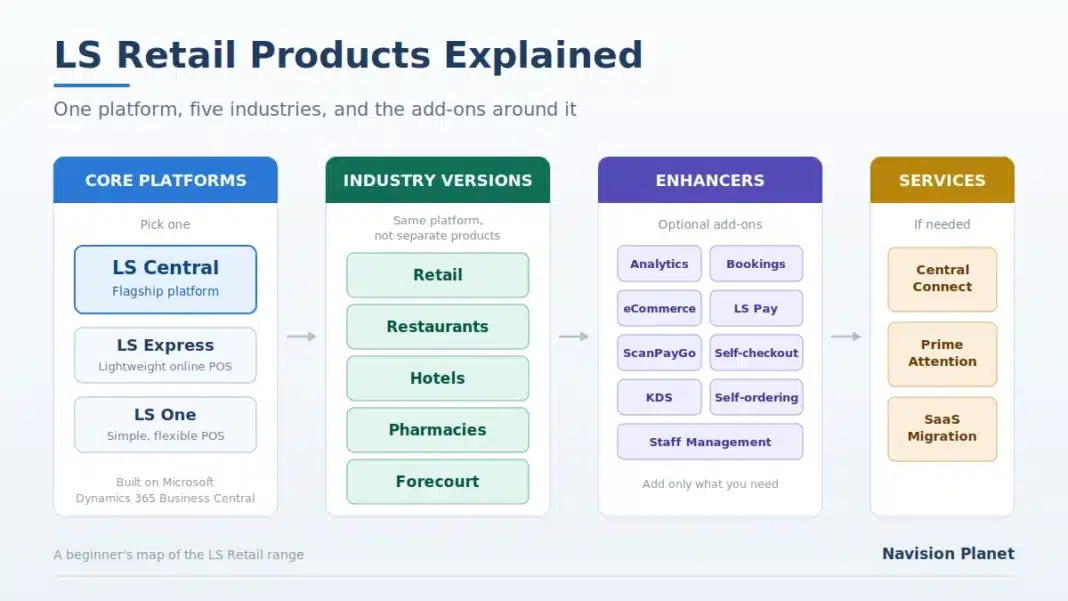
LS Retail makes three POS platforms: LS Central (the flagship, built on Microsoft Dynamics 365 Business Central), LS Express (lightweight online POS), and LS One (a simpler, flexible POS). The most important thing to understand is that LS Central for retail, restaurants, hotels, pharmacies and forecourt are not five separate products. They are the same platform with different industry functionality switched on. Around that sit optional software enhancers such as Analytics, Bookings, eCommerce, LS Pay and self-checkout.
The first time you look at the LS Retail product range, it is easy to feel lost. There seem to be dozens of products with similar names, several things called LS something, and no obvious starting point. New consultants ask me this constantly, and so do retailers who are evaluating the software for the first time.
The good news is that the range is far simpler than it looks once you understand how it is organised. This guide walks through every product in plain English, explains how they relate to each other and to Microsoft Dynamics 365 Business Central, and helps you work out which pieces you actually need. No sales language, just a clear map.
📋 In This Guide
Table of Contents
How the Product Range Is Organized
Everything LS Retail sells falls into four groups. Hold this shape in your head and the rest follows easily.
| Group | What it contains |
|---|---|
| Core platforms | The POS and operations systems you build on: LS Central, LS Express, LS One. You pick one. |
| Industry versions | LS Central tailored for retail, restaurants, hotels, pharmacies or forecourt. Not separate products. |
| Software enhancers | Optional add-ons: analytics, bookings, eCommerce, payments, self-checkout, kitchen screens and more. |
| Services | Support and integration offerings such as PrimeAttention, CentralConnect and SaaS Migration. |
So a real deployment is usually: one core platform, one industry version, a handful of enhancers, and possibly a service. That is it.
The One Thing Beginners Get Wrong
Here is the misunderstanding I correct more than any other. People see “LS Central for retail”, “LS Central for restaurants”, “LS Central for hotels”, “LS Central for pharmacies” and “LS Central for forecourt” and assume these are five different products they must choose between, like five different software packages.
They are not. It is one platform, LS Central, with different industry functionality. The retail version and the restaurant version share the same core: the same POS engine, the same inventory, the same replenishment, the same Business Central foundation. What differs is the industry-specific layer on top, such as menu and kitchen management for restaurants, or prescription handling for pharmacies.
💼 From 19 Years in the Field
This matters practically, not just conceptually. A hotel with a gift shop and three restaurants does not buy three products. It runs LS Central with hospitality and retail functionality together, on one database, with one set of items and one set of financials. That is the entire point of the platform, and it is the thing that sells it against a patchwork of separate systems. If someone tells you that you need to buy separate products per concept, they have misunderstood the product.
LS Central and Its Industry Versions
LS Central is the flagship. It is a unified POS and retail operations platform built on Microsoft Dynamics 365 Business Central, which means your till and your ERP are the same system rather than two systems joined by an integration. It suits everything from a single store to large multi-country chains.
The five industry versions:
| Version | Built for, and what it adds |
|---|---|
| LS Central for retail | Multi-store chains. Transactions, inventory, pricing, promotions and order fulfilment, with centralised control across locations and channels. |
| LS Central for restaurants | Quick service, coffeehouses, takeaways and table service. Adds ordering, menu configuration, kitchen workflows and service operations. |
| LS Central for hotels | Properties mixing retail, dining and guest services. Coordinates outlets across a site and gives visibility of onsite revenue. |
| LS Central for pharmacies | Paper and e-prescriptions, health appointments, dispensing and front-of-store sales, with the control that regulated processes demand. |
| LS Central for forecourt | Fuel retailers running gas stations and convenience stores. Connects fuel pump transactions with store sales, pricing and payments. |
💡 Tip for evaluators: if your business spans more than one of these, that is an argument for LS Central rather than a complication. Mixed-concept sites are exactly what the platform is designed for.
LS Express and LS One
Not everyone needs the full platform. LS Retail offers two lighter POS options for simpler operations.
LS Express is an online POS and retail operations solution for businesses with straightforward retail needs. It covers core selling, product and inventory management and essential reporting, in a deliberately lightweight system. If you want to run day-to-day retail with minimal complexity and get going quickly, this is the entry point.
LS One is LS Retail’s other POS option, positioned around simplicity, speed and flexibility. It suits businesses that want a capable till system without the depth of the full LS Central platform.
📌 Think about where you are going, not just where you are. Choosing a lighter product because you are small today is reasonable, but if you expect to grow into multi-store operations with deep inventory and replenishment needs, factor the eventual move into your decision. Migrating platforms later is real work. Ask your partner what the upgrade path looks like before you commit.
Software Enhancers (The Add-Ons)
These are optional modules you bolt onto your platform. You do not need them on day one, and most businesses start with two or three, then add more as they mature.
| Enhancer | What it does |
|---|---|
| Analytics for LS Central | Cloud business intelligence powered by Microsoft Power BI. Dashboards and reports over your LS Central data, on a monthly subscription. |
| Bookings for LS Central | Reservation management for events, workshops, courses, classes and ticketing. |
| eCommerce for retail | Connects your website to your stores: real-time stock, click and collect or delivery, personalised offers and promotions. |
| eCommerce for restaurants | Online ordering linked to your physical locations, so customers choose where and how they order. |
| LS Pay | Electronic fund transfer software connecting to payment providers, with EMV and PCI compliance across store, restaurant, forecourt and online. |
| Staff Management | Rosters, work hours, absence handling and a view of scheduling costs against budget. |
| ScanPayGo | Customers scan items on their phone, pay in the app and leave. Cuts queues and adds personalisation. |
| Self-checkout for retail | Self-service checkout software to reduce queues and manual work at the till. |
| Restaurant self-ordering | Self-ordering that connects customers, POS and kitchen for faster and more accurate orders. |
| Kitchen Display System (KDS) | Screens replacing kitchen printouts. Organises orders by station and sequence, linking front and back of house. |
Services and Integration
Three offerings sit outside the software itself but come up regularly, particularly in larger projects.
CentralConnect is a managed integration that connects LS Central to a separate enterprise ERP such as SAP S/4HANA or Dynamics F&O. It exists for large organisations that want LS Central’s retail capability while keeping an ERP they cannot replace. We cover it in depth in our CentralConnect guide.
PrimeAttention is a premium support programme for organisations running LS Retail software in mission-critical environments, offering proactive monitoring, priority support and expert guidance.
SaaS Migration is a service for moving existing LS Retail systems to cloud deployment, which matters if you are on an older on-premises installation and planning your route to SaaS.
How It All Relates to Business Central
This trips up people coming from the Microsoft side. LS Central is built on Microsoft Dynamics 365 Business Central. It is not a separate application that talks to Business Central; it extends it. When you use LS Central you are using Business Central, with retail and hospitality functionality added.
The practical consequences are worth spelling out:
- Your POS transactions and your general ledger live in one system, so a sale traces natively through to financials.
- Standard Business Central capability (finance, purchasing, inventory, reporting) is available to you as part of the platform.
- Business Central skills transfer directly. If you know Business Central, you already understand a large part of LS Central.
- LS Central versions track Business Central releases, so upgrade planning follows the Microsoft rhythm.
If you are new to the underlying ERP as well, our Business Central guides are a good companion, and the LS Central architecture explained post shows how the pieces fit together technically.
Which Product Do You Need?
A practical way to narrow it down.
| If this sounds like you | Start with |
|---|---|
| A single shop with simple needs, wanting to get running quickly | LS Express or LS One |
| Several stores, real inventory and replenishment needs, growing | LS Central for retail |
| Restaurants, cafés or takeaways with kitchen operations | LS Central for restaurants, plus KDS |
| A hotel or resort with shops, dining and guest services | LS Central for hotels |
| A pharmacy handling prescriptions and regulated stock | LS Central for pharmacies |
| Gas stations with convenience stores | LS Central for forecourt |
| A large enterprise whose SAP or F&O system is staying put | LS Central plus CentralConnect |
Then add enhancers to match your actual plans. Selling online? Add eCommerce. Long queues? Consider self-checkout or ScanPayGo. Reporting a struggle? Analytics. Resist the temptation to buy everything at once; add each piece when there is a real need behind it.
Old Names You May Still Come Across
LS Retail has renamed things over the years, and older documentation, forum posts and job adverts still use the previous names. This confuses newcomers badly, so here is a quick orientation.
| Name you may see | What it refers to |
|---|---|
| LS Nav / LS Retail NAV | The predecessor to LS Central, built on Microsoft Dynamics NAV. Much of the underlying logic carried forward. |
| LS Insight | The earlier business intelligence and analytics offering. Reporting is now delivered through Analytics for LS Central. |
| LS Forecast | Cloud demand forecasting feeding replenishment, referenced in older LS Central documentation. Check current availability with LS Retail. |
| LS Activity | The older reservations and appointments module. This capability now sits under Bookings for LS Central. |
| LS Hospitality | The older name for restaurant and hospitality functionality, now the restaurants and hotels versions of LS Central. |
📋 Practical advice
When you find older LS documentation, check which version it was written for before following it. The concepts usually still hold, but page names and navigation change between releases. Always confirm against the LS Retail Help for your own version.
FAQ, LS Retail Products
What is the difference between LS Retail and LS Central?
LS Retail is the company. LS Central is its flagship software product, a unified POS and retail operations platform built on Microsoft Dynamics 365 Business Central.
Are LS Central for retail and LS Central for restaurants different products?
No. They are the same platform with different industry functionality. The core POS, inventory and Business Central foundation are identical, and a business running both retail and dining uses one system rather than two products.
Is LS Central the same as Business Central?
LS Central is built on Business Central and extends it with retail and hospitality capability. When you use LS Central you are using Business Central underneath, which is why POS transactions flow natively into the general ledger.
What is the difference between LS Central, LS Express and LS One?
LS Central is the full platform for chains and complex operations. LS Express is a lightweight online POS for simpler retail needs. LS One is another simpler, flexible POS option. Choose based on operational complexity and growth plans.
What are software enhancers?
Optional add-on modules for your platform, including Analytics, Bookings, eCommerce for retail and restaurants, LS Pay, Staff Management, ScanPayGo, self-checkout, restaurant self-ordering and the Kitchen Display System.
Do I need to buy all the enhancers?
No. Most businesses start with two or three that solve a current problem, then add more over time. Buying everything at once adds cost and complexity without a matching benefit.
What is CentralConnect?
A managed integration connecting LS Central to a separate enterprise ERP such as SAP S/4HANA or Dynamics F&O. It suits large organisations keeping their existing ERP while standardising the store front end on LS Central.
What was LS Nav?
LS Nav was the predecessor to LS Central, built on Microsoft Dynamics NAV. If you find LS Nav documentation, the concepts often still apply, but check it against your current version.
Who implements LS Retail software?
LS Retail supplies the software, and a global network of partners handles implementation and ongoing support. So you buy and deploy through a partner rather than directly.
Final Thoughts
The LS Retail range looks complicated from outside and is genuinely simple once you see its shape: pick one core platform, apply the industry version that matches your business, add the enhancers you actually need, and use the services if your situation calls for them.
The single insight worth carrying away is that LS Central is one platform, not five. That is what allows a hotel with restaurants and a gift shop, or a forecourt with a convenience store, to run everything on one system with one set of data. Understanding that makes every other decision in the range much easier.
Stay tuned to NavisionPlanet for more practical LS Central and Business Central guidance drawn from real store implementations.
Note: LS Retail’s product range, product names and packaging change over time. This guide is an independent overview for people new to the ecosystem, based on LS Retail’s published product information. Confirm current products, availability and licensing on the official LS Retail products page or with an LS Retail partner. LS Retail, LS Central, LS Express and LS One are trademarks of LS Retail ehf. Navision Planet is not affiliated with or endorsed by LS Retail.
📖 Related guides on Navision Planet:
→ LS Central Architecture Explained
→ CentralConnect: Running LS Central With an Enterprise ERP
→ Gift Card in LS Central: Setup, Sell and Redeem
→ LS Central Technical Interview Questions + Mock Exam