105 Business Central Functional Interview Questions and Answers (2026) + Free Mock Exam.
Preparing for a Dynamics 365 Business Central functional consultant interview? Then you are in the right place. This is the most complete bank of Business Central interview questions you will find online, with 105 real questions and answers collected from my 18+ years of conducting and facing interviews across Dynamics NAV and Business Central projects.
Moreover, the questions are grouped into three levels so you can jump straight to your experience band. In addition, there is a free online mock exam at the end that you can attempt right on this page. As a result, you get both a study guide and a self-test in one post. If you are a Technical consultant instead, see my companion post: 105 Business Central Technical interview questions.
📝 Note: Click any question to expand the answer. These answers are intentionally short and interview-ready. However, in a real interview you should expand them with examples from your own projects.
This guide covers 105 Business Central interview questions across beginner, experienced, and expert levels.
🟢 Beginner Business Central Interview Questions (0–2 Years)
These beginner-level Business Central interview questions cover fundamentals, navigation, and core master data. If you are a fresher or transitioning from another ERP, you should therefore master all 40 before your interview. Furthermore, these topics form the foundation for every functional role.
1. What is Dynamics 365 Business Central?
Business Central is Microsoft’s cloud-based ERP for small and mid-sized businesses. It covers finance, sales, purchasing, inventory, projects, warehouse, service, and manufacturing in a single application. Additionally, it is the successor of Dynamics NAV (Navision).
2. What is the difference between Business Central Essentials and Premium?
Essentials covers finance, sales, purchasing, inventory, projects, and warehousing. Premium, on the other hand, adds Service Order Management and Manufacturing. As a result, Premium costs more per user, and all full users in a company must be on the same edition.
3. What is a Role Center?
The Role Center is the personalized home page a user sees after login. It shows cues, KPIs, activities, and shortcuts relevant to that user’s role, such as Business Manager or Accountant. Consequently, each role gets a tailored experience.
4. What is the difference between a Card page and a List page?
A List page shows many records in rows (like the Customer List). In contrast, a Card page shows all details of one record (like a single Customer Card) organized in FastTabs.
5. What is master data in Business Central? Give examples.
Master data is the relatively static reference data that transactions are built on. For example, Customers, Vendors, Items, G/L Accounts, Fixed Assets, Resources, and Bank Accounts are all master data.
6. What is the Chart of Accounts?
The Chart of Accounts is the complete list of G/L accounts used to record financial transactions. Each account has a number, name, account type (Posting, Heading, Total, Begin-Total, End-Total), and income/balance classification.
7. What are Posting Groups?
Posting groups are the mapping between master data and G/L accounts. In other words, they tell Business Central which accounts to hit when you post a transaction, so users never pick G/L accounts manually on documents.
8. Name the three main types of posting groups.
First, Specific posting groups (Customer, Vendor, Bank, Fixed Asset, Inventory). Second, General posting groups (General Business and General Product). Third, Tax/VAT posting groups (VAT Business and VAT Product).
Business Central Interview Questions on Documents and Journals
9. What is a Customer Posting Group used for?
It defines the receivables account and related accounts (payment discounts, interest, additional fees, invoice rounding) used when posting customer transactions.
10. What is the General Journal?
The General Journal is a worksheet for posting entries directly to G/L accounts and other accounts (customer, vendor, bank, fixed asset) without a document. For example, you would use it for accruals, corrections, or opening balances.
11. What is the difference between a Journal, a Batch, and a Template?
A Template defines the journal type and default settings (e.g., General, Payment, Cash Receipt). A Batch is a named workspace under a template, so multiple users can work separately. Finally, the Journal lines are the actual entries inside a batch.
12. Explain the standard Sales order-to-cash flow.
Sales Quote → Sales Order → Shipment (post ship) → Sales Invoice (post invoice) → Payment receipt → Application to invoice. Each posting creates ledger entries and posted documents. This is one of the most common Business Central interview questions for freshers.
13. Explain the standard Purchase procure-to-pay flow.
Purchase Quote → Purchase Order → Receipt (post receive) → Purchase Invoice (post invoice) → Payment → Application. Optionally, a Purchase Requisition or Planning Worksheet feeds the order.
14. What happens when you post a sales invoice?
Business Central creates a Posted Sales Invoice, Customer Ledger Entries, G/L Entries (receivables, revenue, VAT), VAT Entries, and Item Ledger/Value Entries if items were sold. Therefore, one action creates entries across multiple subledgers.
15. What is a Credit Memo?
A credit memo reverses or reduces a posted invoice. It is used for returns, overbilling, or corrections. Specifically, sales credit memos reduce receivables while purchase credit memos reduce payables.
16. What are Dimensions?
Dimensions are analytical tags (like Department, Project, Region) attached to transactions for reporting, without needing separate G/L accounts. You can have unlimited dimensions, with 2 global and 8 shortcut dimensions readily available.
17. What is the difference between Global and Shortcut dimensions?
Global dimensions (2 max) are stored directly on every ledger entry and can be used as filters everywhere. In contrast, Shortcut dimensions (up to 8, including the 2 global ones) are quick-entry columns on journals and documents.
18. What is an Item Card and name key fields on it?
The Item Card holds all data for a product: No., Description, Base Unit of Measure, Item Category, Costing Method, Unit Cost, Unit Price, posting groups, and replenishment settings.
19. What are the costing methods available in Business Central?
FIFO, LIFO, Average, Standard, and Specific. The costing method determines how the cost of goods sold and inventory value are calculated. This is a frequently asked Business Central interview question.
Inventory, Locations and Planning Interview Questions
20. What is a Location?
A Location represents a physical place where inventory is stored, such as a warehouse or store. Items can be tracked per location, and transfer orders move stock between locations.
21. What is a Transfer Order?
A Transfer Order moves inventory from one location to another with a ship and receive step. Optionally, it routes through an in-transit location, keeping full traceability.
22. What is the difference between Payment Terms and Payment Method?
Payment Terms define when payment is due (e.g., 30 days, 2% discount in 10 days). However, Payment Method defines how it is paid (bank transfer, cash, cheque). Both are assigned on customer and vendor cards.
23. What is the Cash Receipt Journal used for?
It records incoming customer payments and applies them to open invoices, updating the customer ledger and bank account. For more on the related reconciliation process, see my bank reconciliation guide.
24. What does “applying entries” mean?
Applying links a payment to its invoice(s) so both entries close. As a result, unapplied entries remain open and show in aging reports.
25. What is a Recurring Journal?
A journal for entries that repeat regularly (rent, depreciation-like accruals). It uses recurring methods (Fixed, Variable, Balance, etc.) and a recurring frequency, so lines stay after posting and can be reused.
26. What is Number Series?
Number Series (No. Series) controls the automatic numbering of records and documents, such as customers, items, orders, and posted invoices. Furthermore, it supports start/end numbers and manual override options.
27. What is the difference between Work Date and System Date?
The System Date is the actual computer date. In contrast, the Work Date is a user-set default posting date, useful when entering yesterday’s or a specific period’s transactions.
28. How do you filter data in a list? Name some filter symbols.
Use the filter pane (Shift+F3). Common symbols include: .. (range), | (OR), & (AND), <> (not equal), * (wildcard), and @ (case-insensitive).
29. What is Edit in Excel and how is it different from Export to Excel?
Export to Excel is one-way, creating a static copy. However, Edit in Excel uses an add-in to modify records and publish changes back to Business Central.
Business Central Interview Questions on CRM and Sales Features
30. What is a Contact and how does it relate to Customers/Vendors?
Contacts are the CRM entities (companies and persons). A contact can be linked to a customer, vendor, or bank account, thereby keeping addresses and communication synchronized.
31. What is a Blanket Order?
A blanket order is a long-term agreement for a quantity over time. You release partial sales or purchase orders against it as deliveries are needed. Consequently, pricing and terms stay locked.
32. What are Item Charges used for?
Item charges add landed costs like freight, customs, or insurance to the item’s cost after (or with) the purchase. As a result, inventory value and COGS are accurate.
33. What is the Requisition Worksheet?
A planning tool that suggests purchase orders based on demand, reorder policies, and stock levels. The buyer then reviews and carries out the action messages.
34. What is a Drop Shipment?
The vendor ships directly to your customer. The sales order line is marked Drop Shipment, linked to a purchase order, and inventory never physically enters your warehouse. Therefore, no warehouse handling is needed.
35. What are Posted Documents? Can they be edited?
Posted documents (posted invoices, shipments, receipts) are the permanent legal record after posting. They cannot be edited. Instead, you correct them via credit memos, cancel, or correction functions.
36. What is the Navigate (Find Entries) function?
Find Entries shows every related entry created by a document number or posting: G/L entries, VAT entries, ledger entries, and posted documents. It is, therefore, the fastest audit tool in the product.
37. What is the difference between Ship and Invoice on a sales order?
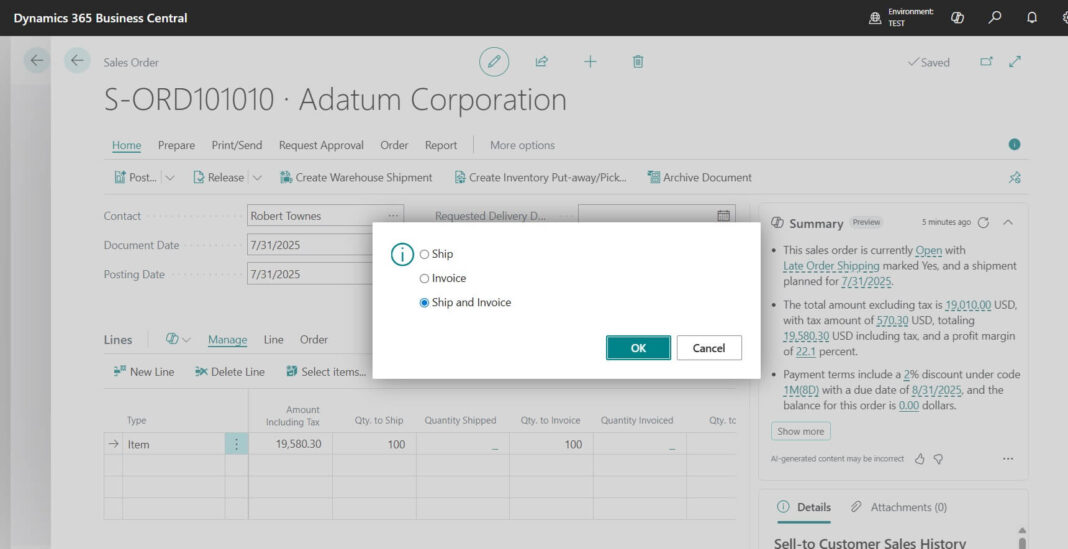
Ship posts the physical outflow (item ledger, COGS interim). Invoice posts the financial part (revenue, receivables, VAT). You can post them together or separately for partial flows. This distinction is a classic Business Central interview question.
38. What is a Payment Journal and what is Suggest Vendor Payments?
The Payment Journal records outgoing vendor payments. Suggest Vendor Payments automatically fills lines for due invoices based on filters like due date and available payment discounts.
39. What is a Fixed Asset in Business Central?
A Fixed Asset card tracks a long-term asset with depreciation books, acquisition cost, depreciation method (straight-line, declining balance), and disposal handling.
40. What are Reason Codes and Source Codes?
Source Codes identify where an entry came from (which journal/document type). Reason Codes, on the other hand, explain why (return, correction). Both therefore improve the audit trail.
💡 Tip: For beginner Business Central interview questions, panels love candidates who can demo the sales order flow live. Therefore, practice posting a quote-to-invoice cycle in a sandbox until you can do it in under 3 minutes while explaining each ledger impact.
🟠 Experienced Business Central Interview Questions (2–6 Years)
These mid-level Business Central interview questions test setup depth, period-end processes, inventory costing, and cross-module knowledge. Furthermore, expect scenario framing: “a client wants X, how do you configure it?” If you have worked on 2+ implementations, you should be comfortable with all of these.
Mid-level questions focus heavily on posting setup, costing, and period-end close processes.
Posting Setup and Costing Interview Questions
41. Explain the General Posting Setup matrix.
It is the intersection of Gen. Business Posting Group (who) and Gen. Product Posting Group (what), defining sales, purchase, COGS, inventory adjustment, and discount accounts for each combination.
42. How does VAT/Tax calculation work in Business Central?
The VAT Posting Setup matrix combines VAT Business and VAT Product posting groups to determine the VAT %, calculation type (Normal, Reverse Charge, Full VAT), and VAT accounts. For countries like the US, Sales Tax with tax areas/jurisdictions is used instead.
43. What is the Adjust Cost – Item Entries batch job and why is it critical?
It forwards actual costs from inbound entries (purchases, output) to outbound entries (sales, consumption), thereby correcting COGS and inventory value. Without it, margins and inventory valuation are wrong. It can also run automatically via Inventory Setup.
44. Difference between Expected Cost and Actual Cost posting?
Expected cost arises from received-not-invoiced quantities (interim accounts). Actual cost, on the other hand, posts when the invoice arrives. “Expected Cost Posting to G/L” in Inventory Setup controls whether interim values hit the G/L.
45. What does “Automatic Cost Posting” do?
When on, value entries post to the G/L immediately at transaction time. When off, however, you must run Post Inventory Cost to G/L periodically to reconcile inventory subledger to G/L.
⚠️ Warning: The costing questions (Q43–Q45, Q75) are where most mid-level candidates fail. If you cannot explain Adjust Cost – Item Entries confidently, stop and learn it before any Business Central interview. It comes up in almost every panel.
Period-End and Financial Reporting Questions
46. Walk me through a month-end close in Business Central.
Typical sequence: first, post all pending documents and journals. Then, run Adjust Cost and post inventory cost to G/L. Next, reconcile bank accounts and run VAT settlement. After that, post recurring journals/accruals and review aging and reconciliation reports. Finally, restrict the Allow Posting From/To dates in General Ledger Setup and User Setup.
47. How do you close a fiscal year?
In Accounting Periods, run Close Year. Then run the Close Income Statement batch job, which generates a journal moving P&L balances to retained earnings. Finally, post that journal on the closing date (C-date).
48. Can you post into a closed fiscal year?
Yes, closing a year does not block posting. Entries post as prior-year adjustments, and you re-run Close Income Statement to update retained earnings. Actual blocking is done via Allow Posting dates instead.
49. What is Bank Reconciliation and how does it work?
The Bank Acc. Reconciliation page matches bank ledger entries to imported bank statement lines (manually or auto-match) and posts differences. Additionally, Payment Reconciliation Journals can apply and post payments directly from the statement. For step-by-step details, see my bank reconciliation guide.
50. What are Reminder Terms and Finance Charge Terms?
Reminder Terms define dunning levels, grace periods, and fees for overdue customers. Finance Charge Terms, on the other hand, define interest calculation on overdue balances. Both are assigned on the customer card. I cover this topic in detail in my reminders and finance charge memos guide[VERIFY URL].
51. What is Intercompany functionality?
IC setup lets two companies exchange IC sales/purchase documents and IC general journals through IC partners, an IC chart of accounts, and inbox/outbox. As a result, it reduces duplicate entry between group companies.
52. How is Consolidation different from Intercompany?
Intercompany automates transactions between companies day-to-day. Consolidation, in contrast, aggregates the trial balances of business units into a consolidation company for group reporting, with currency translation and eliminations.
53. What are Analysis Views?
Analysis Views pre-aggregate G/L (or budget) data by up to 4 dimensions plus date compression. They therefore power Analysis by Dimensions and financial reports with dimension columns.
54. What are Financial Reports (Account Schedules)?
Row definitions plus column definitions that build P&L, balance sheet, cash flow, and KPI reports directly on G/L, budgets, and analysis views. These were formerly called Account Schedules.
Inventory, Warehouse and Planning Interview Questions
55. How do Item Tracking (Serial/Lot) numbers work?
An Item Tracking Code on the item defines whether serial/lot/package tracking is required inbound or outbound. Numbers are captured on documents via Item Tracking Lines, providing full traceability, expiration handling, and recall support.
56. Difference between Reorder Point, Maximum Qty, Fixed Reorder Qty, and Lot-for-Lot policies?
These are reordering policies: Fixed Reorder Qty orders a set amount at reorder point; Maximum Qty tops up to a maximum; Lot-for-Lot batches actual demand in a period; Order creates a 1:1 supply per demand (make/buy-to-order).
57. What is the Planning Worksheet vs Requisition Worksheet?
Requisition Worksheet plans purchases and transfers only. Planning Worksheet (Premium/manufacturing), in contrast, additionally plans production orders and runs full MPS/MRP.
58. What are Assembly Orders and when do you use them instead of Production Orders?
Assembly is light kitting (available in Essentials): combine components into a kit, assemble-to-order or to-stock, with no routings or work centers. Production Orders (Premium), on the other hand, support routings, capacities, and shop floor output.
59. Explain warehouse configuration levels in Business Central.
From basic to advanced per location: no warehouse handling → Inventory Pick/Put-away (order-by-order) → Warehouse Shipment/Receipt → full Directed Put-away and Pick with zones, bin rankings, and worksheets. Choosing the right level is a common experienced Business Central interview question.
60. What is a Physical Inventory Journal vs Item Journal?
The Item Journal posts positive/negative adjustments and reclassifications. The Physical Inventory Journal, however, is purpose-built for counting: calculate expected inventory, enter counted qty, and post the differences.
61. What are Inventory Counting Periods?
Assigned to items, they define how often an item must be counted (cycle counting). The system consequently flags items due for counting when you run Calculate Counting Period in the physical inventory journal.
Workflows, Currencies and Data Handling Questions
62. How do Prepayments work on sales/purchase orders?
Prepayment % on the order generates a prepayment invoice before shipment. Amounts post to prepayment accounts and are then deducted automatically on the final invoice.
63. What is Deferral functionality?
Deferral Templates spread revenue or expense across periods automatically. For example, a 12-month subscription invoice would post to a deferral account and release per schedule.
64. What are Approval Workflows?
Built-in workflows route documents (purchase orders, sales documents, journals, customer/vendor changes) to approvers based on limits and hierarchies, with email/notification integration. Additionally, custom flows can also run through Power Automate.
65. How does the Business Central + Power Automate integration work functionally?
Business Central exposes triggers and actions (record created/modified, approvals) in Power Automate. Common uses therefore include custom approval chains, Teams notifications, and syncing data to other systems without code.
66. What is the difference between Currencies and Additional Reporting Currency?
Currencies handle transactional FX with exchange rates and periodic Adjust Exchange Rates revaluation. Additional Reporting Currency (ACY), on the other hand, maintains a parallel G/L in a second currency for reporting. Importantly, enabling it is effectively irreversible.
67. How do you handle payment discounts?
Payment Terms define discount % and date. On application within the discount date, Business Central consequently posts the discount to the accounts defined in posting setup, with VAT adjustment if configured.
68. What are Substitutions, Cross References, and Nonstock/Catalog Items?
Substitutions suggest alternatives when stock is short. Item References map your item numbers to customer/vendor/barcode numbers. Catalog (nonstock) items, in addition, are sellable items not kept on the item list until first used.
69. What is the Exact Cost Reversing principle on returns?
On return orders, Appl.-from Item Entry links the return to the original outbound entry so it reverses at the exact original cost. This therefore prevents valuation distortion. It can also be enforced via setup.
70. How do you correct a posted purchase invoice?
Use Correct (auto credit memo + new invoice), Cancel (credit memo only), or manually create a credit memo with Get Posted Document Lines to Reverse for partial corrections.
71. What is a Retention Policy?
Retention Policies automatically delete aged data (change logs, posted docs where allowed, archived documents) per defined retention periods. As a result, they keep the database lean and compliant.
72. What tools exist for data migration into Business Central?
Configuration Packages (RapidStart) for master data and open entries via Excel, Edit in Excel, data migration wizards (QuickBooks, GP), and APIs/AL for complex loads. Open balances, however, go through journals.
73. What is the Change Log and when would you enable it?
The Change Log tracks insert/modify/delete on selected tables and fields for audit purposes. Enable it selectively (e.g., bank details on vendor) because logging everything hurts performance and bloats data.
74. Difference between User Setup posting date limits and General Ledger Setup limits?
G/L Setup Allow Posting From/To applies company-wide. User Setup, however, overrides it per user. Best practice is therefore a tight company default with a wider range only for the finance close team.
75. A client says inventory value in G/L does not match the Inventory Valuation report. What do you check?
Check that Adjust Cost has run, Post Inventory Cost to G/L is posted, direct postings to inventory accounts are blocked (Direct Posting = No), expected cost posting is consistent, and date filters match. The Inventory – G/L Reconciliation report pinpoints differences.
🔴 Expert Business Central Interview Questions (6+ Years)
Senior-level Business Central interview questions focus on architecture decisions, implementation strategy, licensing, environments, and judgment calls. To answer these well, you should therefore back every answer with a real project story. Additionally, interviewers at this level test your ability to advise clients, not just configure screens.
Expert questions cover environment architecture, licensing strategy, and implementation methodology.
Architecture and Licensing Interview Questions
76. Explain the Business Central environment model (SaaS).
Each tenant gets 1 production + 3 sandbox environments per license (more can be purchased). Sandboxes can be copies of production for testing. Admin Center manages environments, updates, and telemetry.
77. How does the Business Central update cadence work and how do you manage it?
Two major releases (April and October waves) plus monthly minor updates. Updates are mandatory within a window. You manage them by scheduling update dates, testing in a sandbox on the preview version, and validating ISV apps and extensions first.
78. Cloud vs On-Premises Business Central: how do you advise a client?
Cloud (SaaS) provides automatic updates, Copilot/AI features, no infrastructure, and telemetry. However, customization is only via extensions and service limits apply. On-prem gives full control and offline capability, but you own upgrades, hardware, and licensing (dual use rights allow both). Default recommendation today is therefore SaaS unless a hard blocker exists (regulatory, connectivity, deep legacy integration).
79. Explain Business Central licensing at an advisory level.
Essentials $80, Premium $110, Team Members $8, Device $45 (per user/month, billed annually). Premium adds manufacturing and service. All full users must be same edition per environment. Up to 3 free External Accountant licenses. Attach licenses (e.g., Sales Enterprise at $20) available with BC Premium as base. Copilot agents need separately purchased Copilot Credits. For the full breakdown, read my Business Central licensing guide[VERIFY URL].
80. When do you recommend Team Members licenses and what are their limits?
For users who only read data, update existing entries, approve workflows, create quotes, or fill timesheets. They cannot post invoices/orders or run full processes. Wrongly licensing full users as Team Members is therefore a compliance risk in audits.
81. How do you decide between customization (AL extension), ISV app, or process change?
Rule of thumb: configure first, buy second, build last. Standard setup covers most needs. ISV apps from AppSource cover verticals (avoid rebuilding EDI, payroll, shipping). Custom AL is only for true differentiators, with upgrade cost factored into TCO.
Implementation Strategy and Migration Questions
82. What is your implementation methodology for a mid-size BC project?
Phased approach aligned to Success by Design: Diagnostic → Analysis (fit-gap) → Design → Development/Configuration → Deployment (UAT, migration, cutover) → Operation (hypercare). Data migration and testing tracks run in parallel, and go-live is on a period boundary.
83. How do you plan data migration for opening balances?
First, load master data via configuration packages. Then, open entries (customer, vendor, bank) via journals against a migration clearing account. Next, inventory via item journal at correct costs. Finally, G/L trial balance, validating the clearing account nets to zero. Fixed assets are loaded with acquisition plus accumulated depreciation.
84. What is your cutover strategy for go-live?
Freeze legacy transactions, then perform final delta migration of open documents and balances. Next comes reconciliation sign-off (TB, AR/AP aging, inventory valuation matching legacy). After that, verify user access, set up hypercare rota, and document a rollback decision point before switching users.
85. How do you handle multi-company vs multi-environment vs multi-tenant design?
Companies within one environment share extensions and enable intercompany/consolidation easily. Separate environments isolate localization versions, update timing, or divisions. Separate tenants are only for truly independent legal/security boundaries. Fewer environments means lower admin cost.
86. Explain localization handling in a multi-country rollout.
Business Central has country-specific base app localizations. A country’s environment uses its localization. Strategy: a core template (chart of accounts, dimensions, processes) plus per-country layers (VAT/GST, e-invoicing, statutory reporting), rolled out country by country.
87. How does e-invoicing/regulatory compliance fit into BC projects now?
A growing number of countries mandate structured e-invoices (PEPPOL, country CTC models). BC supports E-Documents framework and Microsoft’s Electronic Invoicing capacity (100 transactions/tenant/month included). Plan connectors/ISVs per country early; it is a go-live blocker, not an afterthought.
88. What are the Copilot and AI capabilities in Business Central you would highlight to a CFO?
Copilot in BC (chat, analysis assist, marketing text, bank rec matching suggestions) is included in the user license. Sales Order Agent and Payables Agent automate order capture and AP invoice processing but consume Copilot Credits, sold separately. Position them by FTE-hours saved in AP/order entry.
Integration and Technical Architecture Questions
89. How do you integrate Business Central with external systems? Compare the options.
Standard APIs (REST/OData) for real-time CRUD; custom APIs in AL for tailored contracts; Power Automate/Logic Apps for low-code flows; webhooks for event-driven pushes; Dataverse sync for Dynamics 365 Sales integration; file/AS2/EDI via ISV. Choose per volume, latency, and error-handling needs. Additionally, respect API rate limits in SaaS.
90. How does the Business Central to Dynamics 365 Sales integration work?
Through Dataverse-based synchronization: coupled records (customers↔accounts, items↔products, salespeople↔users), field mappings, and sync jobs. Sales orders from D365 Sales can consequently flow into BC for fulfillment and invoicing. It requires a D365 Sales license.
91. What are Service Limits/Operational Limits in SaaS and why do architects care?
SaaS enforces limits on API calls, web service payloads, report timeouts, and background sessions. High-volume integrations must therefore batch, queue, and handle 429 throttling. Ignoring these limits causes production incidents that on-prem veterans do not anticipate.
92. How do you approach performance troubleshooting functionally in SaaS?
Use Performance Profiler, page inspection, and telemetry in Application Insights (long-running SQL, lock timeouts, slow pages). Functional levers include: reduce flowfields on lists, review heavy extensions, schedule batch jobs off-hours, use archive/retention policies, and maintain dimension and analysis view hygiene.
93. Explain security architecture: permission sets, user groups, and security groups.
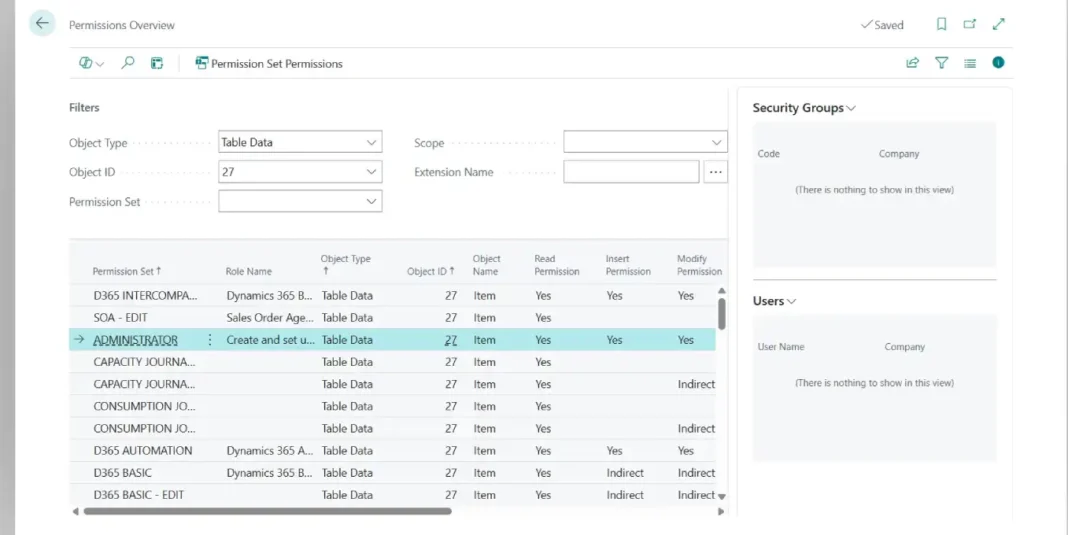
Access = license + permission sets (object-level permissions, now composable/extensible) assigned directly or via security groups (Entra-based, replacing legacy user groups). Design role-based sets per job function with least privilege, and use effective permissions tooling for audits. Restrict SUPER to admins only.
94. What is your approach to testing in BC implementations?
Layered approach: first, unit tests (AL test framework) for custom code. Then, scenario-based UAT scripts per process. Next, regression testing on preview sandboxes before each wave. Also include data validation reconciliations and performance tests for integrations. Store test evidence for auditability.
Senior Strategy and Advisory Interview Questions
95. A client on NAV 2016 wants to move to BC SaaS. Outline your upgrade strategy.
First, assess customizations and ISVs. Then decide reimplementation vs technical upgrade (heavily customized old NAV usually favors reimplementation with data migration). Next, convert needed mods to AL extensions or replace with AppSource apps. Use Cloud Migration Tool if lifting data. Run parallel testing and cutover. Sell the delta features (Copilot, Power Platform) as the ROI.
96. How do you scope and control a fit-gap workshop for BC?
Process-led, not screen-led: walk each end-to-end process, classify requirements Fit / Config / Workaround / ISV / Custom, size gaps, and time-box decisions. Output is a traceable requirement register feeding design and test scripts.
97. How do you design dimensions strategy at enterprise level?
Keep global dimensions for the two most-filtered axes (commonly Department and Project/Cost Center). Limit total active dimensions (each adds entry volume). Enforce via Default Dimensions with Value Posting rules (Code Mandatory/Same Code). Additionally, align with the consolidation and BI model up front. Changing global dimensions later is an expensive batch job.
98. What is your approach to chart of accounts rationalization?
Shrink the G/L: accounts for statutory/reporting nature only, while everything analytical moves to dimensions. Target a few hundred accounts with standard numbering ranges, and map legacy COA via migration mapping tables to preserve comparatives.
99. When would you recommend Warehouse Management (directed pick/put-away) vs basic inventory picks?
Directed WMS when: multiple pickers, bin-level accuracy issues, wave/zone picking, replenishment logic, or barcode scanning needs. Otherwise, basic inventory picks keep training and process overhead low. Never switch a live location’s warehouse setup mid-flight without a stock freeze.
100. How do you evaluate an ISV app before recommending it?
Check AppSource validation, update cadence vs BC waves, support SLA, per-tenant telemetry impact, data footprint, exit strategy (data portability), reference customers in the same localization, and total subscription cost vs building.
101. Describe a rollback/contingency plan for a failed go-live.
Predefined decision gate (e.g., day 2 reconciliation failure), legacy kept read-write until gate passes, delta transaction log to re-key if reverting, communication tree, and root-cause review before rescheduling. The existence of the plan is often what interviewers check.
102. How do you govern master data quality post go-live?
Ownership matrix (who creates customers/items), approval workflows on master data changes, templates (customer/item templates) to enforce defaults, change log on sensitive fields, and periodic quality KPIs (duplicates, missing posting groups).
103. What KPIs do you set up for a CFO dashboard in BC?
Cash position and forecast, AR/AP aging buckets, DSO/DPO, gross margin by dimension, inventory value and turns, budget vs actual by department. Delivered via Financial Reports, embedded Power BI apps for BC, and Role Center cues.
104. How do you keep implementations evergreen (wave-proof)?
Extension-only customizations, no event-heavy hot paths, ISVs with committed wave support, preview-sandbox regression each wave, telemetry alerts, feature management review per release notes, and a standing “release readiness” checklist owned by the support team.
105. What differentiates a great BC functional architect from a good consultant?
Judgment: knowing when standard is enough, translating business outcomes into minimal configuration, protecting upgradeability, quantifying decisions in money (license mix, ISV vs build), and communicating trade-offs to both the warehouse operator and the CFO in their own language. This is ultimately the most important Business Central interview question for senior roles.
❗ Important: At senior level, interviewers rarely want textbook answers. For every expert question above, prepare one real project story: the situation, your decision, and the measurable outcome. That is what separates a hire from a maybe.
🎯 Business Central Interview Questions: Free Mock Exam
Ready to check your level? Attempt this 15-question timed mock exam covering all three levels of Business Central interview questions right here. You get 10 minutes, one question at a time, just like a real certification or screening test. Your score and answer review appear at the end. No sign-up is needed, and your attempt is not stored anywhere.
Test your BC functional knowledge with this 15-question timed mock exam.
📝 BC Functional Mock Exam10:00
Rules: 15 multiple choice questions · 10 minute limit · Pass mark 70% (11/15) · You can go back and change answers before submitting.
💡 Tip: Scored below 70%? Bookmark this page, revise one level of Business Central interview questions per day, and retake the exam before your interview. Repetition over 3 sittings beats one long cram session.
Final Words on Preparing for Business Central Interview Questions
These 105 Business Central interview questions cover what actually gets asked in functional consultant interviews in 2026, from navigation basics to architecture judgment calls. Do not memorize; instead, understand the why behind each answer and attach your own project examples. Interviewers can spot recitation instantly.
Which Business Central interview question stumped you in a real interview? Share it in the comments and I will add it (with the answer) to this list.
Trademarks & Screenshots: Microsoft, Dynamics 365, Business Central, Dynamics NAV, and related names are trademarks of Microsoft Corporation. LS Central and LS Retail are products of LS Retail. Screenshots are used for educational and illustrative purposes only. Navision Planet is an independent resource and is not affiliated with, endorsed by, or sponsored by Microsoft or LS Retail. All product names, logos, and brands are the property of their respective owners.
Jubel Thomas Joy, a 19+ year Microsoft Dynamics 365 Business Central/NAV/Navision expert, founded "Navision Planet" in 2009. Certified in Business Central , D365 - Commerce and many more. He blogs on the latest updates and various modules of Business Central & LS Central, showcasing expertise in SQL, Microsoft Power Platforms, and over 150 organizations of work experience.