



Top 5 This Week

Related Posts

Job Queue in Microsoft Dynamics NAV

Job Queue in Navision

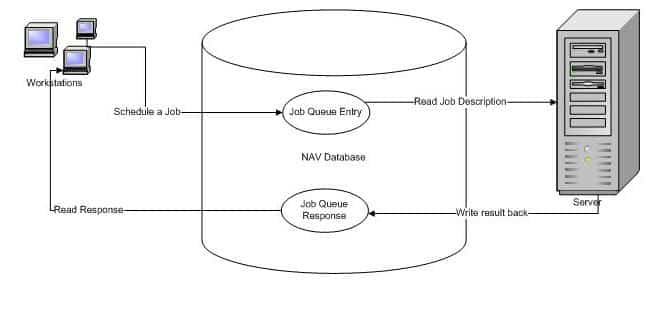
The Job Queues Entry table is where users or processes can enter a request for execution of a report or a codeunit. The Server (NAS) will look periodically into the Job Queue Entry table to see if there is a Job to execute.

The NAS will when it finds a Job Queue Entry, read it, delete it from the table (unless it is a recurring job) and then start running the requested job (report or codeunit).
Job Queue Microsoft Dynamics
Job Queue flow

When the report or codeunit finishes, the NAS will write a ‘response’ into the Job Queue Response table. In case the calling process has requested this (as is the case for the Outlook integration). The NAS will also insert a record into the Job Queue Log Entry table to record that it has processed a Job (this is not shown on the drawing).

Related Topic: Navision Application Server(NAS)

Trademarks & Screenshots: Microsoft, Dynamics 365, Business Central, Dynamics NAV, and related names are trademarks of Microsoft Corporation. LS Central and LS Retail are products of LS Retail. Screenshots are used for educational and illustrative purposes only. Navision Planet is an independent resource and is not affiliated with, endorsed by, or sponsored by Microsoft or LS Retail. All product names, logos, and brands are the property of their respective owners.
Jubel
Jubelhttps://www.navisionplanet.com
Jubel Thomas Joy, a 18+ year Microsoft Dynamics 365 Business Central/NAV/Navision expert, founded "Navision Planet" in 2009. Certified in Business Central , D365 - Commerce and many more. He blogs on the latest updates and various modules of Business Central & LS Central, showcasing expertise in SQL, Microsoft Power Platforms, and over 150 organizations of work experience.

LEAVE A REPLY

Please enter your comment!
Please enter your name here

Popular Articles