Table of Contents
Learn AL Programming Language for Business Central
If you have ever worked with C/AL in Dynamics NAV, or you are starting fresh, this tutorial walks you through AL programming from the very beginning. AL is the language you use to build extensions for Microsoft Dynamics 365 Business Central, and unlike the old C/SIDE environment, you write it in Visual Studio Code as clean, source-controlled, upgrade-safe code. By the end of this post you will understand how AL projects are set up, the main object types, data types, variables, control flow, and how to write your first working extension — with practice exercises along the way.
What you’ll learn
What is AL?
AL (Application Language) is the programming language used to develop and customize Microsoft Dynamics 365 Business Central. It is the modern successor to C/AL, the language used in the older C/SIDE environment of Dynamics NAV.
The key difference is the development model. In NAV you edited objects directly inside the database using C/SIDE. In Business Central you write AL in Visual Studio Code, and your customizations are packaged as extensions self-contained apps that sit on top of the base application without changing it. This makes your code upgrade-safe, version-controlled, and far easier to maintain.
With AL you can create and extend tables, pages, and reports; add business logic; respond to events raised by the base application; call APIs; and build entire vertical solutions — all without touching Microsoft’s source code.
Setting up your AL environment
Before writing a line of AL, you need three things in place:
| What you need | Why |
|---|---|
| Visual Studio Code | The editor where you write all AL code. Free from Microsoft. |
| AL Language extension | Adds AL syntax, IntelliSense, compiling, and debugging to VS Code. Install from the VS Code Marketplace. |
| A Business Central environment | A sandbox to deploy and run code — a cloud sandbox (free with a trial) or a Docker/on-prem container. |
Once VS Code and the AL Language extension are installed, you create a new project by opening the Command Palette (Ctrl+Shift+P) and running AL: Go!. This scaffolds a starter project for you, including the two files that matter most.
app.json and launch.json
Every AL project has an app.json file — the manifest that describes your extension: its name, publisher, version, and which platform and application versions it targets. The launch.json file tells VS Code which Business Central environment to deploy to when you press play.
Your first AL extension : “Hello World”
The classic starting point. When you run AL: Go!, VS Code generates a small sample that adds a message to the Customer List page. Here is the essence of it a page extension that shows a greeting when the page opens:
pageextension 50100 CustomerListExt extends "Customer List"
{
    trigger OnOpenPage()
    begin
        Message('Hello world — my first AL extension!');
    end;
}
Press F5. VS Code compiles the extension, publishes it to your sandbox, and opens Business Central in the browser. Navigate to the Customer List and the message pops up your first working extension, with nothing in Microsoft’s code touched.
50100. Custom objects use IDs in the free range 50000–99999. IDs below that belong to Microsoft and partners. Always stay in your assigned range.AL object types
In C/AL you worked with Tables, Forms, Reports, Dataports, and Codeunits. AL modernizes this list. These are the object types you’ll use most:
| Object | Purpose |
|---|---|
| table | Defines data storage — fields, keys, and table-level logic. |
| tableextension | Adds fields or logic to an existing Microsoft table without altering it. |
| page | The UI — how users view and edit data. Replaces NAV Forms. |
| pageextension | Adds fields, actions, or logic to an existing page. |
| report | Printed or previewed output, plus batch processing. |
| codeunit | A container for business logic — procedures with no UI of their own. |
| enum / enumextension | A modern, extensible replacement for the old Option data type. |
| query | Reads and joins data efficiently for analysis or APIs. |
| xmlport | Imports and exports data (survives from NAV). |
The pattern to internalize: for your own data you create table and page objects; to change Microsoft’s objects you create tableextension and pageextension objects. You never edit the base app directly.
Triggers in AL
Just like C/AL, AL is event-driven through triggers — blocks of code that run automatically when something happens. If you learned NAV, these feel familiar, but the syntax is cleaner.
Common triggers include OnRun (codeunits), OnOpenPage and OnAfterGetRecord (pages), and OnInsert, OnModify, OnValidate (tables and fields). A trigger looks like:
trigger OnInsert()
begin
    // runs automatically when a record is inserted
end;
Data types
A data type defines what kind of value a variable can hold. Pick the wrong one and 12 + 36 could give you 48 (numbers) or '1236' (text). Here are the core AL data types.
Numeric
| Type | Holds | Example |
|---|---|---|
| Integer | Whole numbers | 0, 42, -1000 |
| Decimal | Numbers with fractions | 12.50, -2.008 |
| BigInteger | Very large whole numbers | 9223372036854775807 |
Text
| Type | Holds | Notes |
|---|---|---|
| Text | Free-form characters | In modern AL, length is optional and can be unbounded. |
| Code | Characters forced to uppercase | Leading/trailing spaces removed. Used for keys like item numbers. |
| Char | A single character | ‘A’, ‘7’, ‘?’ |
Boolean, Date and Time
| Type | Holds | Example |
|---|---|---|
| Boolean | True or false | true, false |
| Date | A calendar date | 0D (undefined), 31-12-2025 |
| Time | A time of day | 10:30:00 |
| DateTime | Date and time together | Stored in UTC |
Enum – the modern Option
C/AL used the Option type for a fixed list of choices. AL replaces this with enum, which is extensible — other extensions can add values without editing it:
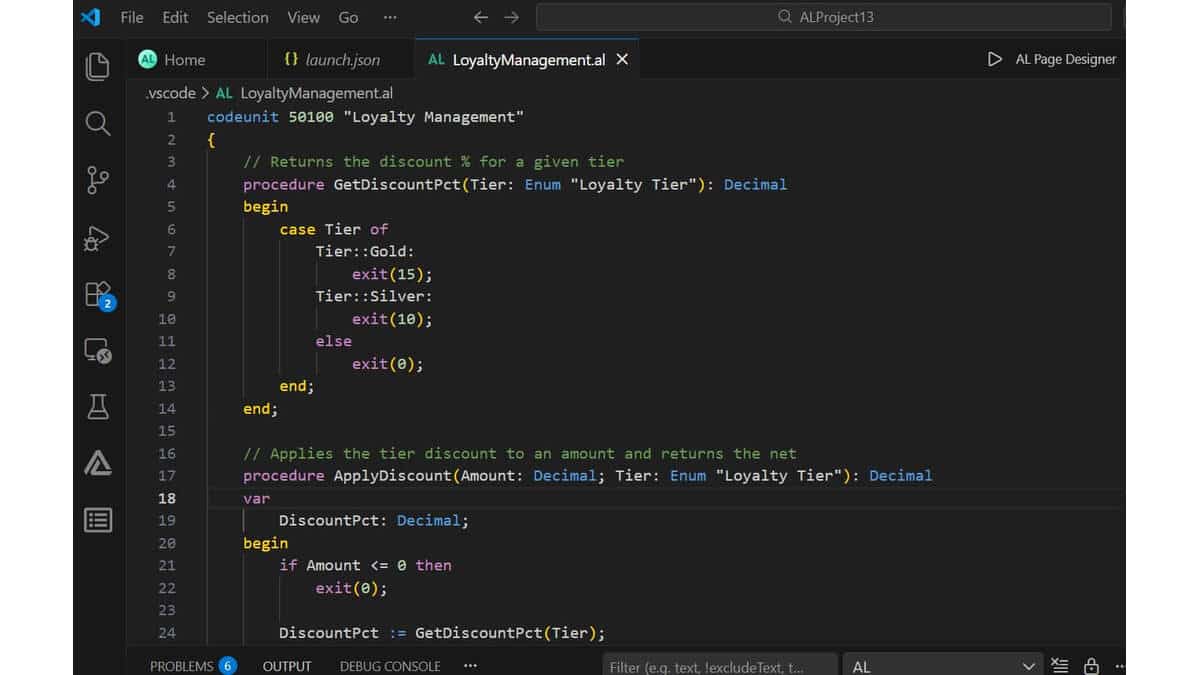
enum 50100 "Loyalty Tier"
{
    Extensible = true;
    value(0; Standard) { Caption = 'Standard'; }
    value(1; Silver) { Caption = 'Silver'; }
    value(2; Gold) { Caption = 'Gold'; }
}
The Message function
Message is the simplest built-in function in AL it pops a dialog box on screen. Perfect for testing and quick notifications. The classic first line:
Message('HELLO WORLD');
Insert values with placeholders. %1, %2 are replaced in order by the arguments that follow:
Message('The value of %1 is %2', 'my name', 'Jubel Thomas Joy');
Write a page extension that shows a message reading “Welcome to Business Central!” when the Item List page opens.
Show answer
pageextension 50101 ItemListExt extends "Item List"
{
    trigger OnOpenPage()
    begin
        Message('Welcome to Business Central!');
    end;
}
Variables
A variable is a named container for a value that can change while your code runs. Every variable has a data type. In AL you declare variables in a var block, either at the top of a procedure (local) or in the object’s global var section.
var
    SampleText: Text[30];
    MyNumber: Integer;
    Total: Decimal;
Assignment uses := (not just =). A complete example:
trigger OnOpenPage()
var
    SampleText: Text[30];
begin
    SampleText := 'My Sample Text';
    Message('The value of %1 is %2', 'SampleText', SampleText);
end;
Variable scope
| Scope | Where it lives |
|---|---|
| Global | Declared in the object’s top-level var section; usable anywhere in that object. |
| Local | Declared inside a procedure or trigger; usable only there. |
| System-defined | Maintained by the platform, e.g. Rec and CurrPage. |
- Declare an Integer variable called
Minimum, store 100, and show it in a message. - Declare two Decimal variables, add them, and display the result.
Show answers
1)
var
    Minimum: Integer;
begin
    Minimum := 100;
    Message('The value of %1 is %2', 'Minimum', Minimum);
end;
2)
var
    Num1: Decimal;
    Num2: Decimal;
    Result: Decimal;
begin
    Num1 := 2;
    Num2 := 7;
    Result := Num1 + Num2;
    Message('The value of %1 is %2', 'Result', Result); // 9
end;
Operators and expressions
An expression is a formula that produces a value, such as Quantity * UnitPrice. Expressions combine variables, constants, and operators.
Relational operators
These compare two values and return a Boolean: = equal, <> not equal, < less than, > greater than, <=, >=, and in (included in a set).
Logical operators
and, or, xor, and not combine Boolean values. For example (Qty > 0) and (Price > 0) is true only when both sides are true.
Guarding string length with MaxStrLen
Assigning too many characters to a bounded text variable throws a runtime error. MaxStrLen returns the max length, and CopyStr safely trims to fit:
Description := CopyStr('The message is: ' + CodeB, 1, MaxStrLen(Description));
IF / THEN / ELSE
The if statement runs code conditionally, based on whether a Boolean expression is true. Simplest form:
if Total > 50 then
    Message('Total value is greater than 50');
Add else to handle the false case:
if Total > 50 then
    Message('Total value is greater than 50')
else
    Message('Total value is 50 or less');
if…then…else, the statement before else does not take a semicolon – the semicolon ends the whole statement after the else branch. This trips up almost every beginner.Compound statements with begin…end
To run several lines under one condition, wrap them in begin…end:
if Quantity <> 0 then
    begin
        UnitPrice := ExtendedPrice / Quantity;
        TotalPrice := TotalPrice + ExtendedPrice;
    end;
Exiting early
Use exit to leave a procedure or trigger immediately — handy for guarding against errors like dividing by zero:
if Quantity = 0 then
    exit;
UnitPrice := TotalPrice / Quantity;
CASE statement
When you’d otherwise stack many if…else if checks against the same variable, case is cleaner AL’s version of a switch statement:
case Tier of
    Tier::Gold:
        Message('Gold member');
    Tier::Silver, Tier::Standard:
        Message('Silver or standard member');
    else
        Message('Unknown tier');
end;
Each branch can match a single value or a comma-separated set, and the optional else catches everything not listed.
Loops – repeating work
Loops run a block of code multiple times. AL gives you three main forms.
FOR loop
Use for when you know how many times to repeat. It counts up (to) or down (downto):
for i := 1 to 5 do
    Result := Result + 5;
WHILE…DO loop
Use while to repeat as long as a condition stays true. Checked before each pass, so the body may run zero times:
while Sales[i + 1] <> 0 do
    begin
        i := i + 1;
        TotalSales := TotalSales + Sales[i];
    end;
REPEAT…UNTIL loop
Use repeat…until when the body must run at least once. Checked after each pass. The workhorse for reading through database records:
if Customer.FindSet() then
    repeat
        // process each customer here
    until Customer.Next() = 0;
Working with records
A record variable represents a row in a table and gives you access to all its fields through dot notation, e.g. Customer.Name. This is where AL does its real work.
var
    Customer: Record Customer;
begin
    if Customer.Get('10000') then
        Message('Customer name is %1', Customer.Name);
end;
Common record methods you’ll use constantly: Get, FindSet / FindFirst, SetRange / SetFilter, Insert, Modify, and Delete.
WITH…DO statement is deprecated in AL. Always write the record name explicitly (Customer.Name, not just Name). It’s clearer and the compiler now requires it.Write code that loops through every customer, counts how many exist, and shows the count in a message.
Show answer
var
    Customer: Record Customer;
    Count: Integer;
begin
    if Customer.FindSet() then
        repeat
            Count := Count + 1;
        until Customer.Next() = 0;
    Message('There are %1 customers', Count);
end;
In practice you’d use Customer.Count() — but the loop shows the pattern you’ll reuse everywhere.
Procedures and parameters
A procedure is a named, reusable block of code — what C/AL called a function. Define it once, call it whenever needed. Procedures usually live in codeunits.
procedure CalculateLineAmount(Qty: Decimal; Price: Decimal): Decimal
begin
    exit(Qty * Price);
end;
Here Qty and Price are parameters, and : Decimal is the return type. Call it like this:
LineAmount := CalculateLineAmount(10, 25.50); // 255.00
Pass by value vs. pass by reference
By default parameters pass by value the procedure gets a copy, and changes don’t affect the caller. Mark a parameter with var to pass by reference now it can modify the caller’s actual variable:
procedure AddTax(var Amount: Decimal; Rate: Decimal)
begin
    Amount := Amount + (Amount * Rate);
end;
Local vs. global procedures
A procedure marked local can only be called inside the object where it’s defined. Without it, other objects can call it too. Keep helpers local unless another object genuinely needs them.
Comments
Comments are notes for humans; the compiler ignores them. AL uses two styles:
// Single-line comment — everything after // is ignored

/*
   Block comment
   spanning multiple lines
*/
Good comments explain why a piece of logic exists, not what each line does the code already says what.
Where to go next
You now have the building blocks: environment, objects, triggers, data types, variables, control flow, records, and procedures. The best way to cement them is to build. Create a small table of your own, a page to display it, and a codeunit with a procedure that does something useful then deploy it with F5.
From here, the natural next topics are events and subscribers (the heart of upgrade-safe extensions), report objects, and calling APIs. If you’re coming from NAV, our guide on the differences between C/AL and AL coding will help you translate old habits into modern practice.